Tech Trends Roundup — Week of July 3, 2026
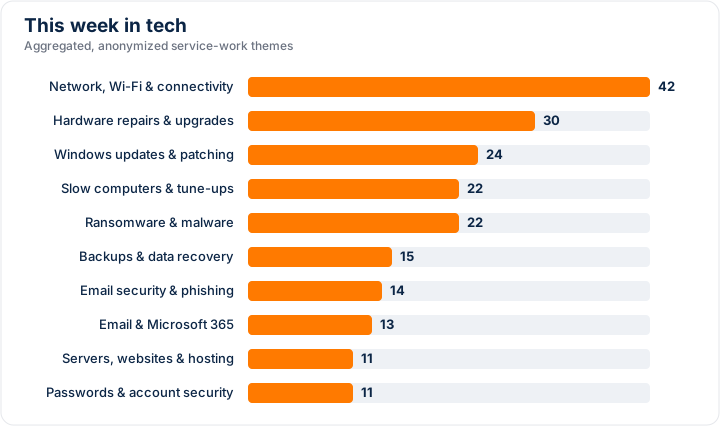
This week's tech trends show that keeping connected, well-maintained, and up to date remains at the heart of everyday IT for small businesses and home users alike.
At a glance
- Network, Wi-Fi and connectivity issues were by far the most common area of work this period.
- Hardware repairs and upgrades came up frequently, from tired components to helpful performance boosts.
- Windows updates and patching featured regularly, keeping systems current and secure.
Network, Wi-Fi & connectivity
Reliable connectivity continues to be the single biggest area people need help with, and small changes often make a big difference. Slow or dropping connections are frequently down to router placement, interference, or ageing equipment rather than the internet service itself.
- Position your router centrally and away from thick walls, metal, and other electronics.
- Restart your router occasionally and keep its firmware up to date.
- Consider a mesh system or extender if certain rooms are hard to reach.
Hardware repairs & upgrades
Physical hardware needs remain common, whether that's replacing worn parts or upgrading to extend a device's useful life. A well-chosen upgrade can often be more cost-effective than a full replacement.
- Adding memory or switching to a solid-state drive can noticeably speed up an older machine.
- Keep vents and fans clear of dust to avoid overheating and slowdowns.
- Watch for early warning signs like unusual noises so small issues don't become big ones.
Windows updates & patching
Staying current with updates is one of the simplest ways to keep systems stable and secure. Regular patching closes known gaps and often improves reliability at the same time.
- Let updates install regularly rather than postponing them indefinitely.
- Restart when prompted so updates can finish applying.
- Make sure your version of Windows is still supported and receiving updates.
Slow computers & tune-ups
Sluggish computers were another recurring theme, and a good tune-up can often restore much of that lost speed. Many slowdowns come from too many background programs, low storage, or software that has built up over time.
- Review programs that start automatically and disable ones you don't need.
- Free up disk space and remove software you no longer use.
- Restart regularly to clear out temporary clutter.
The bottom line
Most of these issues are everyday, manageable ones, and a little regular attention goes a long way toward keeping your technology running smoothly. If any of these topics raise questions about your own setup, the team at WeldonPC is always happy to help — just get in touch and we'll point you in the right direction.