WeldonPC: Tech Briefing — Week of August 30, 2026
Welcome back, Northeast Ohio! Here's your look at the week ahead — the weather, the tech news worth knowing, how the big tech stocks moved, and what kept our bench humming last week. Grab your coffee and let's dig in.
7-Day Weather Outlook — Northeast Ohio
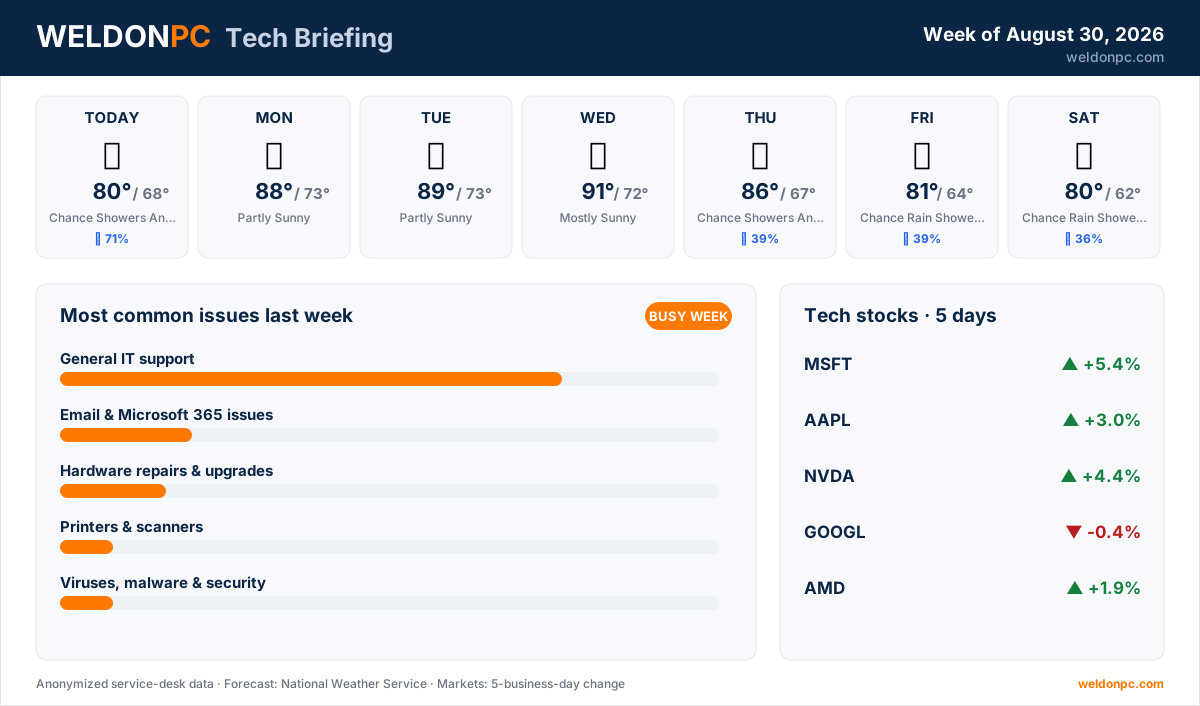
- This Afternoon: Chance showers and thunderstorms, high 80°F, overnight low 68°F, 71% chance of precipitation.
- Monday: Partly sunny, high 88°F, overnight low 73°F.
- Tuesday: Partly sunny, high 89°F, overnight low 73°F.
- Wednesday: Mostly sunny, high 91°F, overnight low 72°F.
- Thursday: Chance showers and thunderstorms, high 86°F, overnight low 67°F, 39% chance of precipitation.
- Friday: Chance rain showers then a slight chance of showers and thunderstorms, high 81°F, overnight low 64°F, 39% chance of precipitation.
- Saturday: Chance rain showers, high 80°F, overnight low 62°F, 36% chance of precipitation.
Midweek is the hot stretch — Wednesday tops out near 91°F — before cooler, wetter air rolls in for the weekend.
Top Consumer Tech Headlines
- Apple raised prices on its Apple One and Apple TV subscriptions by as much as 20 percent, so check your renewal statement if you bundle Apple services (Ars Technica).
- A federal judge ruled the Trump administration's blacklisting of AI company Anthropic over "woke" concerns was illegal (Ars Technica).
- Meta added a new limit to its AI glasses meant to curb recording people without their consent (Ars Technica).
- Authorities arrested two people accused of belonging to the prolific hacking group TeamPCP — a reminder that online crime crackdowns are ongoing (Ars Technica).
- Apple introduced two new small but powerful Macs, good news if you've been eyeing a compact desktop (The Verge).
Tech Stock Trends (Past 5 Business Days)
- Microsoft (MSFT): +5.4% over the past five business days.
- Apple (AAPL): +3% over the past five business days.
- NVIDIA (NVDA): +4.4% over the past five business days.
- Alphabet (Google) (GOOGL): -0.4% over the past five business days.
- AMD (AMD): +1.9% over the past five business days.
Most Common Issues on Our Bench Last Week
It was a busier week than usual on the bench, with jobs coming in at roughly double our normal pace. Here's what we saw, most common first:
- General IT support led the bench again by a wide margin — everything from login snags to sluggish machines. Some of these were quick, but a good number turned into longer projects that stretched across several visits.
- Email & Microsoft 365 issues kept us busy too, and most of those wrapped up within the same week.
- Hardware repairs and upgrades made up a handful of jobs, a few of them longer projects.
- Printers and scanners brought in a couple of cases, mostly quick turnarounds.
- Viruses, malware, and security accounted for a couple of cleanups that took a bit more time to sort out properly.
- Software installs and updates rounded things out with one same-week fix.
Prevention tip for that top category: a lot of "my computer's acting weird" calls trace back to skipped updates and clutter that piles up over months. Set a monthly reminder to install pending updates and restart, and clear out programs you no longer use. If you'd rather hand that off, WeldonPC's managed IT and remote-support plans keep everyday issues in check before they land on the bench.
How-To of the Week
Here's a five-minute tune-up that heads off many of the general slowdowns we see:
- Step 1: Save your open work and close every program.
- Step 2: Check for updates — on Windows, open Settings and click Windows Update; on a Mac, open System Settings and choose General, then Software Update. Install anything waiting.
- Step 3: Restart your computer fully. A true reboot clears out memory hiccups that a sleep-wake cycle won't.
- Step 4: Review your startup programs and turn off apps you don't need launching at boot — fewer of those means a faster start.
- Step 5: Delete files you no longer need and empty the recycle bin or trash to free up space.
- Step 6: If your machine still drags after all that, a WeldonPC computer tune-up digs into the deeper causes in a single visit.
That's your briefing for the week ahead. Whatever pops up — a stubborn PC, a fussy printer, or an email account that won't cooperate — WeldonPC is right here in Northeast Ohio and happy to help.