WeldonPC: Tech Briefing — Week of August 9, 2026
Welcome to your WeldonPC Tech Briefing for the week ahead! We've got a soggy start to the week, a couple of eye-catching tech headlines, some big moves in the stock world, and a practical how-to to keep your computer running clean. Grab your coffee and let's dig in.
7-Day Weather Outlook — Northeast Ohio
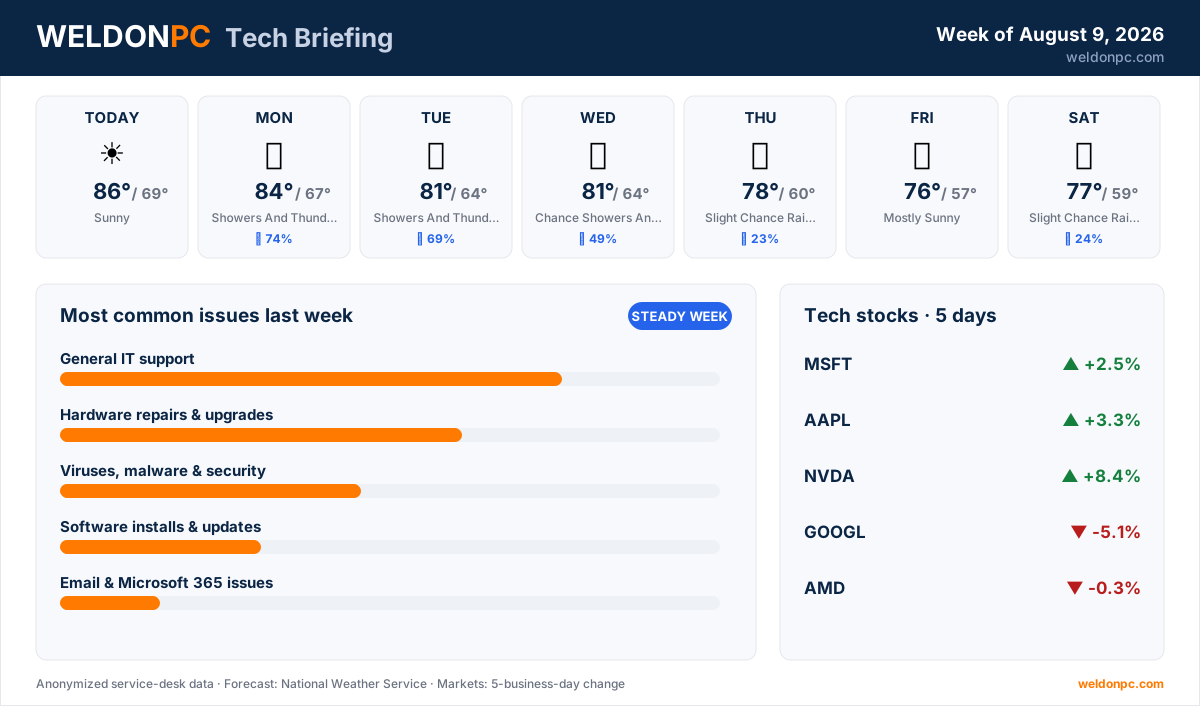
- This Afternoon: Sunny, high 86°F, overnight low 69°F.
- Monday: Showers and thunderstorms likely, then a chance of showers and thunderstorms, high 84°F, overnight low 67°F, 74% chance of precipitation.
- Tuesday: Showers and thunderstorms likely, high 81°F, overnight low 64°F, 69% chance of precipitation.
- Wednesday: Chance of showers and thunderstorms, high 81°F, overnight low 64°F, 49% chance of precipitation.
- Thursday: Slight chance of rain showers, then a slight chance of showers and thunderstorms, high 78°F, overnight low 60°F, 23% chance of precipitation.
- Friday: Mostly sunny, high 76°F, overnight low 57°F.
- Saturday: Slight chance of rain showers, then a slight chance of showers and thunderstorms, high 77°F, overnight low 59°F, 24% chance of precipitation.
Translation: the front half of the week is wet and warm, and it dries out nicely by Friday and the weekend. With storms in the forecast Monday through Wednesday, this is a good week to make sure your electronics are on surge protection.
Top Consumer Tech Headlines
- 1. OpenAI is reportedly building a pricey smart speaker with moving parts designed to make the device feel "more alive" as you interact with it (Ars Technica).
- 2. One writer makes the case that Dropbox can be a surprisingly handy tool for PC builders, helping sync files and settings across a fresh machine (The Verge).
- 3. As AI writing detectors grow more common, they're also generating false accusations and eroding trust between people and institutions (The Verge).
- 4. A reviewer puts a $450 laptop from an unfamiliar brand to the test to see whether the bargain price hides real trade-offs (The Verge).
Tech Stock Trends (Past 5 Business Days)
- Microsoft (MSFT): +2.5% over the past five business days.
- Apple (AAPL): +3.3% over the past five business days.
- NVIDIA (NVDA): +8.4% over the past five business days, the largest gain on this list.
- Alphabet (GOOGL): -5.1% over the past five business days, the only decline of notable size here.
- AMD (AMD): -0.3% over the past five business days, essentially flat.
Most Common Issues on Our Bench Last Week
It was a steady week on the bench, right about where a normal week lands for us.
- General IT support led the bench again, a mix of everyday questions and setup tangles that ran a few longer projects across the week.
- Hardware repairs and upgrades kept us busy, most wrapping up with quick turnarounds.
- Viruses, malware and security brought in a handful of cleanups that took a little patience to see through.
- Software installs and updates made up a couple of jobs, mostly same-day fixes.
- Email and Microsoft 365 accounted for one case, sorted within the week.
- Slow computers and performance rounded things out with one case, also handled within the week.
For general IT support, the best prevention is a little routine housekeeping: keep your operating system and apps updated, write down your key logins in a secure password manager, and reboot weekly so small glitches don't pile up. If you'd rather have a steady hand on all of that, WeldonPC's managed IT and remote-support plans keep an eye on things so the little issues get caught before they become big ones.
How-To of the Week
Storms are in the forecast and general slowdowns topped our bench, so here's a quick weekly cleanup that keeps a Windows PC responsive and reduces the odds you'll need us at all.
- Step 1: Save your open work, then restart the computer fully — a true reboot clears out memory that's been running for days.
- Step 2: Open Settings > Windows Update and install any pending updates, then reboot again if it asks.
- Step 3: Type Disk Cleanup in the search box, run it, and check the boxes for temporary files and old system files to free up space.
- Step 4: Open Task Manager (Ctrl+Shift+Esc), click the Startup tab, and disable programs you don't need launching every time you power on.
- Step 5: With storms possible Monday through Wednesday, make sure your computer, monitor and network gear are plugged into a real surge protector rather than a plain power strip — and check the date on it, since the protection inside wears out after a few years. A battery backup (UPS) on your desktop and modem is even better, because it rides out the quick flickers that cause an unsaved file or a hard shutdown. If a storm is right overhead, unplugging is still the surest protection there is.
Do those five in order and it takes about fifteen minutes, most of which is the computer working while you do something else. Run it weekly and you’ll head off a good share of the slowdowns that end up on our bench.
That’s your briefing for the week. Stay dry through the middle of it, keep an eye on the sky Monday through Wednesday, and if something starts acting up that you’d rather not chase down yourself, WeldonPC is here. See you next Sunday.