WeldonPC: Tech Briefing — Week of November 3, 2026
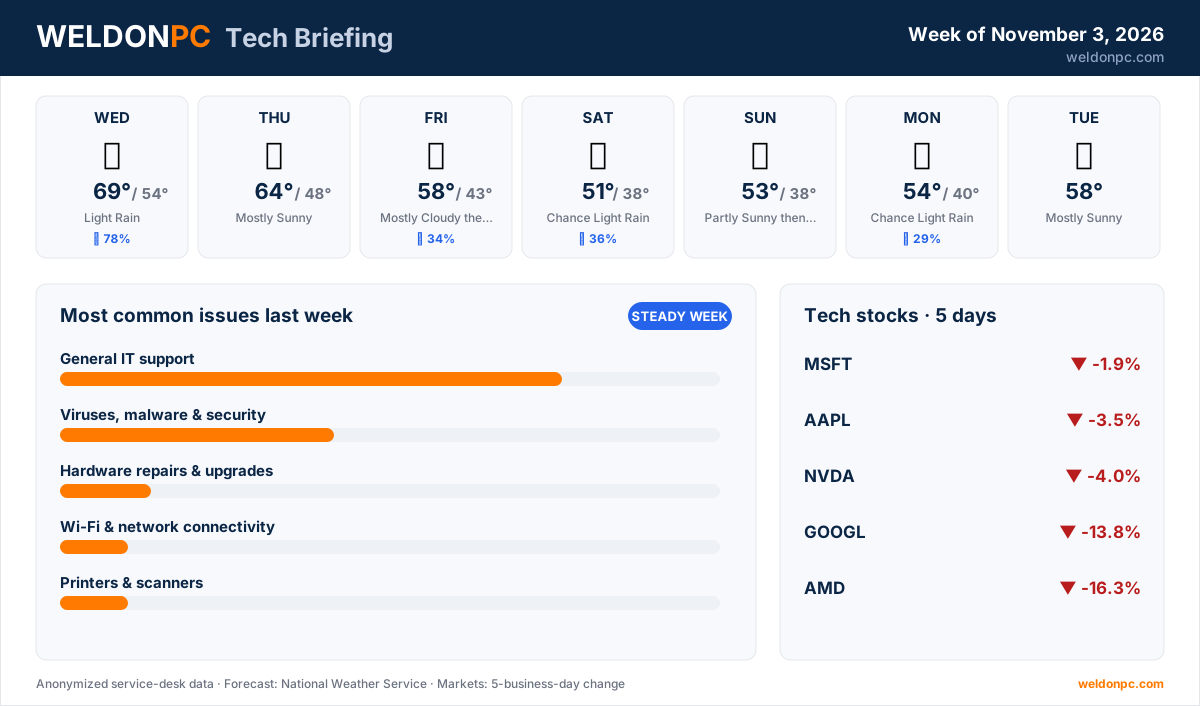
Good morning, Northeast Ohio, and welcome to this week's WeldonPC Tech Briefing. Here's what's ahead: a mild midweek turning cooler and damp by the weekend, a security-heavy batch of headlines, a red week for tech stocks, and a simple maintenance routine worth adopting.
7-Day Weather Outlook — Northeast Ohio
- Wednesday: Light rain and a mild high of 69°F, dropping to 54°F overnight. Rain chances sit at 78%, so keep the umbrella by the door.
- Thursday: Mostly sunny with a high of 64°F and an overnight low of 48°F. It's the pick of the week.
- Friday: Mostly cloudy, then a chance of light rain (34%). High of 58°F, low of 43°F.
- Saturday: Chance of light rain (36%) with a cooler high of 51°F and a low of 38°F. Grab a jacket.
- Sunday: Partly sunny, then a slight chance of light rain. High of 53°F, low of 38°F.
- Monday: Chance of light rain (29%), high of 54°F, overnight low of 40°F.
- Tuesday: Mostly sunny with a high of 58°F, a pleasant way to close the stretch.
Top Consumer Tech Headlines
- 1. "UEFI bootkit infected fully patched Windows machines. Is Microsoft to blame?" A bootkit hides in the firmware that runs before Windows even starts, which is how it reached computers that had every update installed. The piece weighs how much of that falls on Microsoft. (Ars Technica)
- 2. "Google dismantles botnet secretly running on 1.3 million Android TV boxes" Streaming boxes were quietly being used as part of a massive network of hijacked devices, and Google says it has taken that network apart. (Ars Technica)
- 3. "Apple starts giving Siri AI access to third-party apps" Siri's AI features are beginning to reach apps made by outside developers, not just Apple's own. (The Verge)
- 4. "Google will let schools skip AI tools, but they have to give up search, too" Schools can opt out of Google's AI tools, but the trade-off is losing Google search along with them. (Ars Technica)
- 5. "Binance says hackers used fake job interviews and an internal AI tool to pull off the $6.3 billion heist" The crypto exchange says attackers posed as interviewers and used an internal AI tool, a reminder to treat unexpected recruiter outreach with healthy suspicion. (The Verge)
Tech Stock Trends (Past 5 Business Days)
- Microsoft (MSFT): -1.9%. The smallest decline of the five companies listed here.
- Apple (AAPL): -3.5%. A modest pullback, a bit steeper than Microsoft's.
- NVIDIA (NVDA): -4%. A move in the same general range as Apple's.
- Alphabet (Google) (GOOGL): -13.8%. A double-digit drop, the second-largest on this list.
- AMD (AMD): -16.3%. The steepest decline of the group over the period.
Most Common Issues on Our Bench Last Week
It was a quieter stretch on the bench than usual, which gave us room to dig into a few longer jobs.
- General IT support led the bench again: login hiccups, sluggish machines and settings gone sideways. These were mostly same-day fixes.
- Viruses, malware and security kept us busy too, with quick turnarounds on cleanups and suspicious pop-ups.
- Hardware repairs and upgrades came in as a handful of jobs. These were a few longer projects, largely because of parts.
- Wi-Fi and network connectivity accounted for a couple of cases that took more patience than most to track down.
- Printers and scanners brought a couple of jobs, all wrapped up within the week.
- Email and office-suite account issues made up a couple of quick turnarounds, mostly sorted the same day.
Prevention tip: Most general support calls start small. Restart your computer at least once a week, let updates finish instead of postponing them, and jot down the exact wording of any error message. That note alone can turn a long troubleshooting session into a short one.
How-To of the Week
A 10-minute weekly computer check-up
- Step 1: Save your work and do a full restart, not just sleep. It clears out stuck processes and finishes pending updates.
- Step 2: Open your system's update settings and install anything waiting, including driver and security updates.
- Step 3: Check your free storage. If the main drive is nearly full, empty the recycle bin and clear out old downloads.
- Step 4: Run a quick scan with your built-in security software and confirm real-time protection is switched on.
- Step 5: Make sure your backup actually ran recently by opening the backup tool and checking the date of the last successful copy.
- Step 6: If you'd like someone else to keep an eye on all of this, a WeldonPC managed IT and remote-support plan handles these checks in the background and lets us fix most problems without a trip to the shop.
Rain or shine this week, WeldonPC is here to help. Call, stop by, or reach out whenever your tech needs a hand.