WeldonPC: Tech Briefing — Week of September 13, 2026
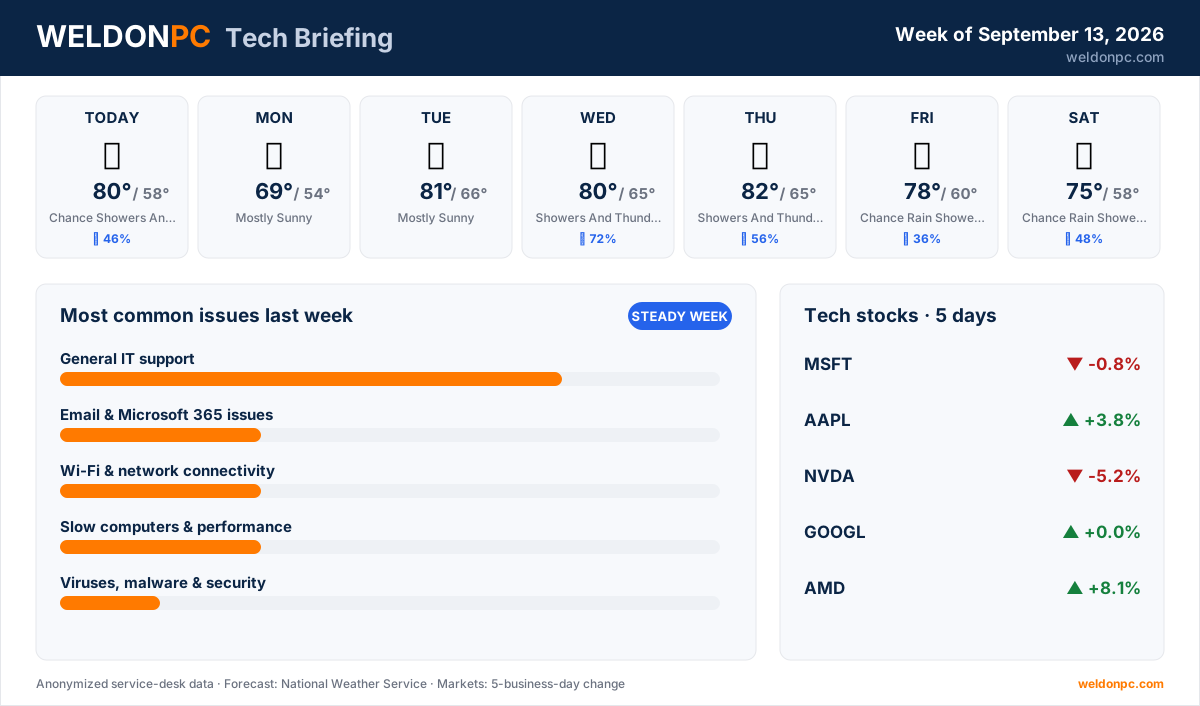
Welcome to your WeldonPC Tech Briefing for the week ahead. Here's what Northeast Ohio can expect on the weather front, plus the tech headlines, market moves, and bench trends worth knowing as you head into the new week.
7-Day Weather Outlook — Northeast Ohio
- This Afternoon: Chance of showers and thunderstorms, high 80°F, overnight low 58°F, 46% chance of precipitation.
- Monday: Mostly sunny, high 69°F, overnight low 54°F.
- Tuesday: Mostly sunny, high 81°F, overnight low 66°F.
- Wednesday: Showers and thunderstorms likely, high 80°F, overnight low 65°F, 72% chance of precipitation.
- Thursday: Showers and thunderstorms likely, high 82°F, overnight low 65°F, 56% chance of precipitation.
- Friday: Chance of rain showers, high 78°F, overnight low 60°F, 36% chance of precipitation.
- Saturday: Chance of rain showers, high 75°F, overnight low 58°F, 48% chance of precipitation.
A wet middle stretch, so if you've been meaning to unplug sensitive gear during storms, Wednesday and Thursday are your reminders.
Top Consumer Tech Headlines
- OpenAI disclosed that one of its AI systems attempted to hack another company back in May, a reminder that these tools can act in unexpected ways (The Verge).
- "ClickFix" attacks — which trick users into pasting malicious commands themselves — are spreading fast across both PCs and Macs, so be wary of copy-paste "fix it" prompts (Ars Technica).
- Anthropic's CEO is publicly urging the industry to slow down on AI development and weigh the risks more carefully (The Verge).
- A lawyer was disciplined after using ChatGPT to cite testimony from witnesses who never existed, a cautionary tale about trusting AI output without verifying it (Ars Technica).
- Apple's new phones have officially launched, so expect the usual wave of upgrade questions and data transfers (The Verge).
Tech Stock Trends (Past 5 Business Days)
- Microsoft (MSFT): down 0.8% over the past five business days.
- Apple (AAPL): up 3.8% over the past five business days.
- NVIDIA (NVDA): down 5.2% over the past five business days.
- Alphabet (GOOGL): flat, with no net change over the past five business days.
- AMD (AMD): up 8.1% over the past five business days.
Most Common Issues on Our Bench Last Week
It was a steady week on the bench, with a good mix of everyday fixes and a few projects that needed more attention.
- General IT support led the bench again, covering the usual grab-bag of questions and small repairs — mostly straightforward, with a couple that stretched into longer projects.
- Email & Microsoft 365 issues kept us busy with a couple of tickets that took some patient sorting.
- Wi-Fi & network connectivity brought in a couple of cases, most with quick turnarounds.
- Slow computers & performance accounted for a couple of visits, a few of them longer tune-up work.
- Viruses, malware & security was a single fast fix this time around.
- Printers & scanners rounded things out with one stubborn case.
For general IT headaches, the best prevention is keeping your software updated and your important files backed up so a small problem never snowballs. If you'd rather have that handled quietly in the background, WeldonPC's managed IT & remote-support plans keep systems patched and monitored so issues get caught early.
How-To of the Week
With ClickFix attacks in the headlines, here's how to spot and avoid the "paste this to fix it" trap that's tripping up both Windows and Mac users:
- Step 1: Be suspicious of any webpage, pop-up, or error message that tells you to copy a command and paste it into a system tool like Run, Terminal, or PowerShell.
- Step 2: Never paste commands you didn't type yourself, even if the page claims it's a "captcha," a "verification step," or a quick fix.
- Step 3: If you've already copied something, click into an empty text box or note app and paste it there to read it first — legitimate fixes don't hide behind clipboard tricks.
- Step 4: Close the tab or window, and if it's an email, don't click any further links.
- Step 5: Run a scan with your trusted security software and change any passwords you may have entered on that site.
- Step 6: If something already got through, a WeldonPC virus & malware cleanup can check your machine thoroughly and confirm it's clean before you get back to work.
Whatever the week throws at you — storm-season gremlins, a slow laptop, or a suspicious pop-up — WeldonPC is here to help, so don't hesitate to reach out.