WeldonPC: Tech Briefing — Week of September 27, 2026
Welcome to a new week, Northeast Ohio! Here's your WeldonPC Tech Briefing for the week ahead — a look at the weather, the headlines worth knowing, how tech stocks moved, and what's been rolling across our repair bench. Grab your coffee and let's dig in.
7-Day Weather Outlook — Northeast Ohio
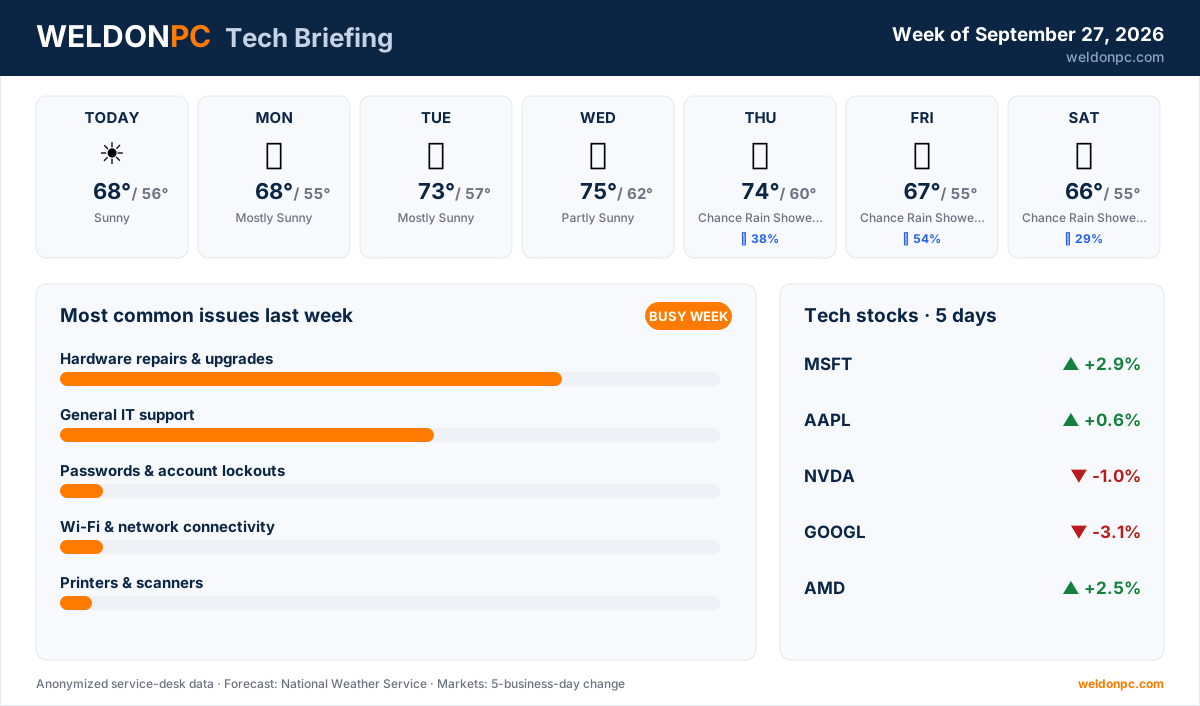
- This Afternoon: Sunny, high 68°F, overnight low 56°F
- Monday: Mostly Sunny, high 68°F, overnight low 55°F
- Tuesday: Mostly Sunny, high 73°F, overnight low 57°F
- Wednesday: Partly Sunny, high 75°F, overnight low 62°F
- Thursday: Chance of Rain Showers, high 74°F, overnight low 60°F, 38% chance of precipitation
- Friday: Chance of Rain Showers, high 67°F, overnight low 55°F, 54% chance of precipitation
- Saturday: Chance of Rain Showers, high 66°F, overnight low 55°F, 29% chance of precipitation
A bright, dry stretch early on, then the showers creep in by midweek. Wednesday's your warmest day, so plan the outdoor errands before Thursday.
Top Consumer Tech Headlines
- 1. Microsoft has backed off pushing shoppers toward pricey "Copilot+ PC" hardware, meaning your existing machine likely does everything you need (Ars Technica).
- 2. A frozen Mac showing a scary "infected" pop-up after a Google ad is a classic scare tactic — the fix rarely involves the fake help line on screen (Ars Technica).
- 3. Cloudflare's CEO is pitching a plan to reshape how AI companies access web content, a debate that could change how the internet works for everyone (The Verge).
- 4. A court ruled the Pentagon can blacklist AI firm Anthropic after it declined to enable certain Claude features, a notable clash between government demands and AI makers (Ars Technica).
- 5. The iPhone 18 Pro earns praise mostly for running cooler under load, with reviewers calling its temperature management its standout trait this year (Ars Technica).
Tech Stock Trends (Past 5 Business Days)
- Microsoft (MSFT): +2.9% over the past five business days.
- Apple (AAPL): +0.6%, roughly flat for the week.
- NVIDIA (NVDA): -1% over the same stretch.
- Alphabet / Google (GOOGL): -3.1%, the biggest mover on this list.
- AMD (AMD): +2.5% for the five-day window.
Most Common Issues on Our Bench Last Week
It was a busier week than usual on the bench, with plenty crossing the counter.
- Hardware repairs & upgrades led the bench again, from failing drives to memory swaps and cooling fixes — a mix of quick turnarounds and a few longer projects.
- General IT support kept us busy right behind it, mostly steady same-day help.
- Passwords & account lockouts brought in a handful of cases, a couple of them stubborn.
- Wi-Fi & network connectivity accounted for a handful of visits, most sorted quickly.
- Printers & scanners made up a couple of tickets that took some patience.
- Email & Microsoft 365 issues rounded out the list with a couple of cases, mostly quick fixes.
For hardware, the best prevention is heat control: keep vents clear, blow out dust every few months, and don't run a laptop on a soft surface that blocks airflow. If a machine feels sluggish or runs hot, a WeldonPC computer tune-up can clear the dust, check drive health, and get it running smoothly again in one visit.
How-To of the Week
Overheating and slow performance often trace back to clogged airflow. Here's a safe, five-step cleanup for a desktop or laptop:
- Step 1: Power down fully and unplug the machine (remove the battery if it's a laptop that allows it).
- Step 2: Take it outside or over a trash can, and use short bursts of canned air to clear the intake and exhaust vents.
- Step 3: Hold fans still with a toothpick or finger while you spray, so you don't spin them too fast and damage the bearings.
- Step 4: Wipe the outer case and screen with a dry microfiber cloth, then let everything sit a minute before powering back on.
- Step 5: Restart and watch the temperatures and fan noise over the next day — quieter fans and cooler air mean it worked.
- Step 6: If it's still running hot or a fan is grinding, the internal cooling may need service — a WeldonPC computer tune-up covers a deep clean and health check in a single stop.
That's your briefing for the week ahead. Whether it's a hot laptop, a stubborn password, or just a machine that's slowed to a crawl, WeldonPC is here to help — stop by or give us a call anytime.